


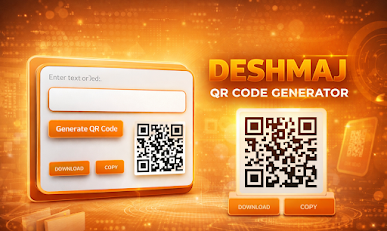
Deshmaj QR Code Generator

Deshmaj QR Code Generator
User Guide
The Deshmaj QR Code Generator is a modern web-based tool that allows users to quickly create QR codes from text, links, or even images. This tool is designed with a clean interface, smooth performance, and user-friendly features such as QR download and copy options. It is ideal for students, business owners, marketers, and everyday users who need QR codes for sharing information quickly.
Introduction to QR Codes
A QR code (Quick Response Code) is a type of barcode that stores information such as website links, text, contact details, or images. When scanned using a smartphone camera or QR scanner, the stored information opens instantly.
The Deshmaj QR Code Generator makes this process simple by allowing users to generate QR codes in just a few steps.
Overview of the Tool Interface
When you open the Deshmaj QR Code Generator, you will see a simple and professional layout with the following main sections:
1. Title Section
At the top, the tool displays the name Deshmaj QR Code Generator, indicating the purpose of the tool.
2. Text Input Field
This is where you enter:
Website URL
Text message
Contact information
Any link or data you want to convert into a QR code
3. Image Upload Option
The tool also allows you to upload an image. When you upload an image, the tool automatically converts the image into a link and generates a QR code for that image.
4. Generate QR Code Button
This button creates the QR code based on the text or image you provided.
5. Download Button
This button allows you to download the generated QR code as an image file.
6. Copy Button
This button copies the QR code image to your clipboard so you can paste it anywhere, such as in documents, social media posts, or presentations.
7. QR Code Display Area
This is where the generated QR code appears after you click the generate button.
Step-by-Step Guide to Using the QR Code Generator
Step 1: Enter Text or Link
In the input field, type the content you want to convert into a QR code. This could be:
A website URL
A YouTube video link
A message
Contact details
A Google Form link
A social media profile link
After entering the text or link, you are ready to generate the QR code.
Step 2: Upload an Image (Optional)
If you want to create a QR code for an image:
Click on the image upload option
Select an image from your device
The tool will automatically prepare it for QR code generation
This feature is useful for sharing posters, documents, product images, or notes through QR codes.
Step 3: Generate the QR Code
Click the Generate QR Code button.
The QR code will appear in the display area within a second.
Make sure the text or image is entered before generating the QR code. Otherwise, the tool will ask you to enter text or upload an image.
Step 4: Download the QR Code
Once the QR code is generated:
Click the Download button
The QR code will be saved to your device as an image file
You can use this image for printing, sharing, or uploading online
Step 5: Copy the QR Code
If you do not want to download the file:
Click the Copy button
The QR code will be copied to your clipboard
You can paste it directly into:
Word documents
PowerPoint presentations
WhatsApp Web
Emails
Social media posts
Where You Can Use QR Codes
QR codes generated from this tool can be used in many places such as:
Business cards
Posters
Flyers
Websites
School assignments
Event invitations
Restaurant menus
Product packaging
YouTube channel promotion
WhatsApp group links
Online portfolios
Benefits of Using Deshmaj QR Code Generator
Easy to use interface
Fast QR code generation
No installation required
Works on mobile and desktop
Download and copy options available
Supports text, links, and images
Clean and professional design
Free to use
Tips for Best Results
Always test your QR code after generating it
Use short links for cleaner QR codes
Make sure the image you upload is clear
Do not delete the QR image before downloading if you need it later
Use high-quality print if you are printing the QR code
Conclusion
The Deshmaj QR Code Generator is a powerful yet simple tool for creating QR codes for various purposes. Whether you want to share a website, image, or message, this tool allows you to generate, download, and copy QR codes بسهولة and quickly.
It is a perfect solution for digital sharing, marketing, education, and business use. With its modern design and useful features, the Deshmaj QR Code Generator provides a professional and efficient way to create QR codes in seconds.


Leave a Reply